

Four ways to ask the same *archive*.
Researchers don’t think the way search bars are built. A genealogist tracing a surname, an archivist looking for a misfiled volume, a historian comparing the cholera years across regions, and a journalist who heard a rumour and has half a name — they’re all asking different questions of the same files. We’ve found that one search box, on its own, is a bad fit for any of them.
So archAIc gives the same archive four faces.
For people who know the shelf
Section titled “For people who know the shelf”The archivists who have spent years with a collection don’t need a search box. They know where things are. They want to drop in at the volume they’re working on, see at a glance which folios in it are relevant to the question of the day, and walk down to the line.
For them archAIc shows the archive as a tree. Collection, book, page, word. Hit counts roll up the tree, so the eye finds the heavy volume before opening anything. You don’t browse pages looking for matches; the system tells you which book to open and which page in it has the dense cluster of mentions.
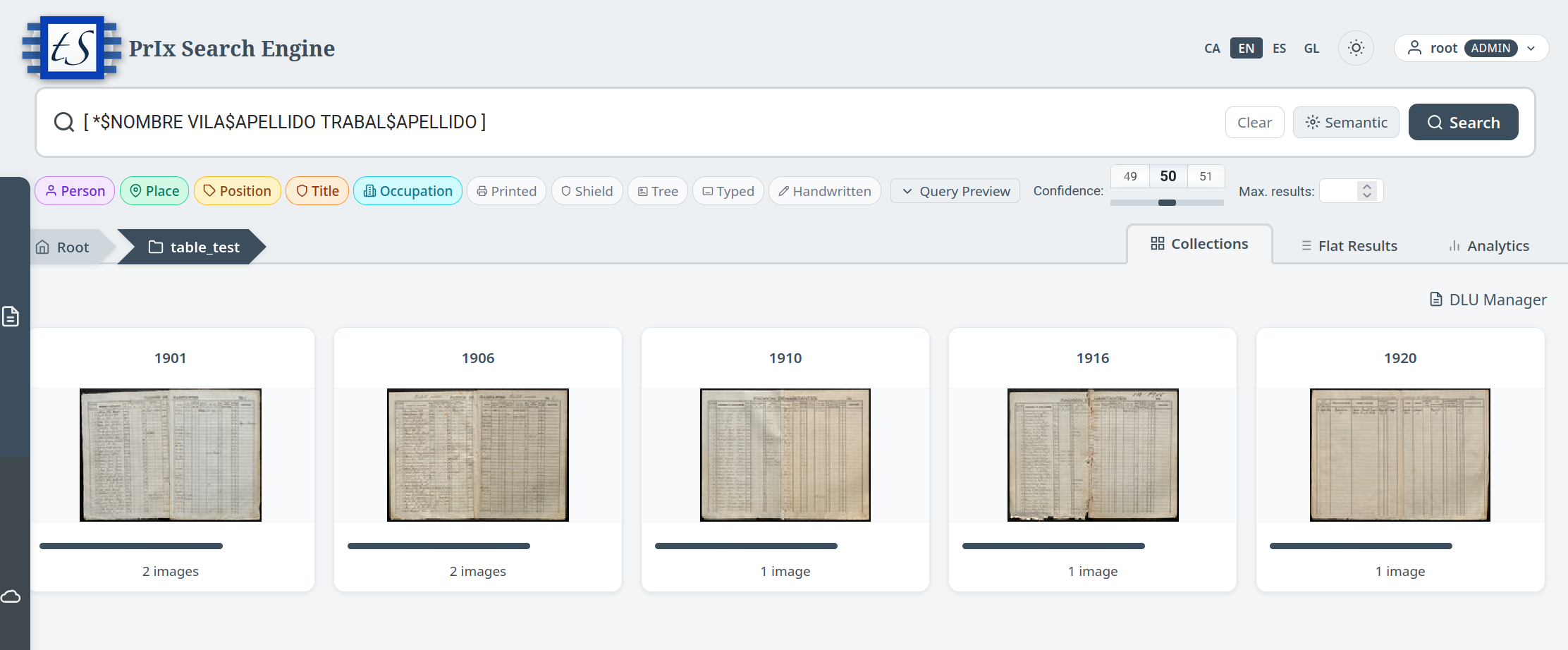 Same query, hierarchical view. The hot volume jumps out before any page is opened.
For people who just want the answer
Section titled “For people who just want the answer”Most users aren’t archivists. They typed a phrase and they want pages, ranked by how relevant each one is. That’s the familiar web-search experience and there’s no point reinventing it.
The flat view is the lowest-friction shape of the engine. Source-agnostic, ranked across the whole corpus, the strongest matches at the top. The same shape is what the system serves to AI assistants over its programmatic interface, so the experience of asking by hand and asking by tool ends up converging.
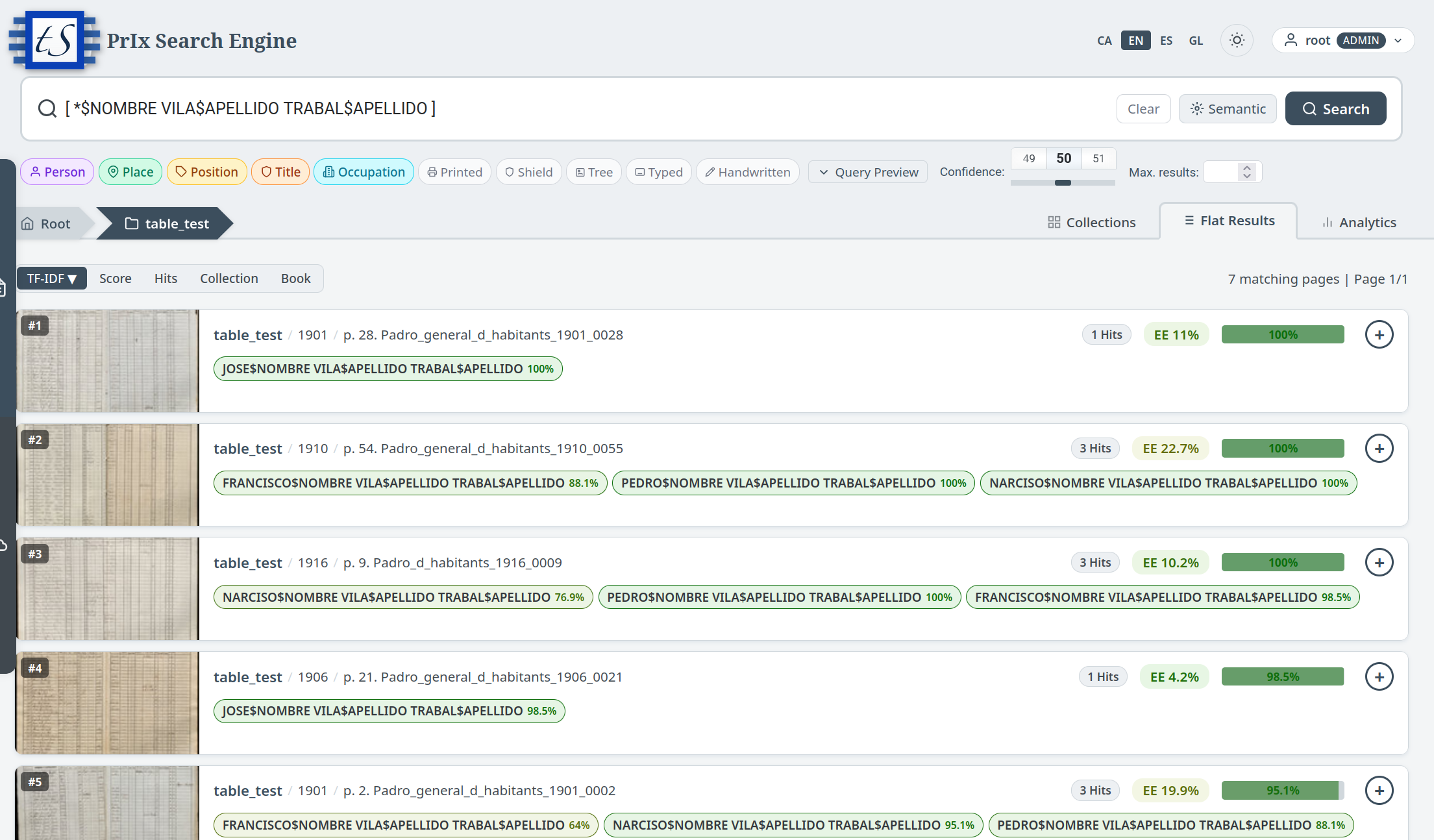 The familiar shape: type a query, get a ranked list. Click a result, the page opens at the line where the match was.
For people asking questions about the questions
Section titled “For people asking questions about the questions”Sometimes the interesting question isn’t “where is this term mentioned” but “how is it distributed”. A historian comparing two regions, a curator deciding which volumes deserve fresh review, a journalist asking when a topic suddenly stopped or started getting written about — these are questions about the shape of the matches, not about any one of them.
The statistics view treats a search as a dataset rather than a list. Word clouds for the vocabulary around a query. Timelines for when matches concentrate. Heatmaps for how confidence varies across volumes. A search that returns fifty thousand hits is unreadable as a list and revealing as a chart.
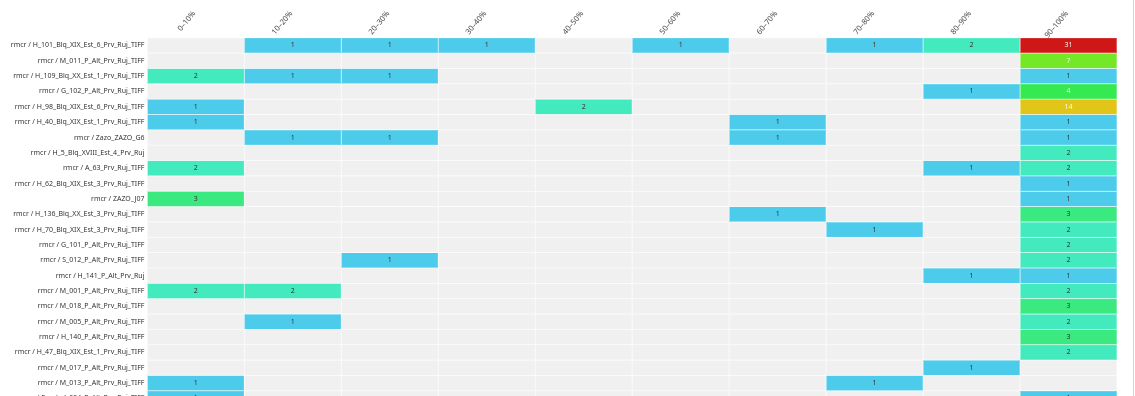 A confidence heatmap. The bright cells are the volumes worth opening; the dim cells are noise.
For people who don’t know the vocabulary
Section titled “For people who don’t know the vocabulary”This is the lens that surprises most newcomers. Old records say things in old ways. A query about “plague control and quarantine” won’t catch the documents that talk about pestilencia, cuarentena, lazareto, aires corruptos, miasma — and there are dozens of those for every one that says plague.
The semantic view searches by meaning rather than by exact words. You ask in plain language; the system finds passages that are about what you asked, regardless of which words the original document used to say it. The engine doesn’t translate the query into the archive’s vocabulary and search again — that would be wrong as often as it was right. It compares meanings directly.
The same trick handles languages. A query in Basque finds Hungarian pages. A query in Catalan finds 17th-century Latin notarial books. Nothing has to be translated, because the system never reads the query as words in the first place — it reads it as a vector of meaning, and pages of any language reduce to the same kind of vector. No shared vocabulary required.
This is not a translation step.
archAIc does not translate your query into the archive’s language and then run a keyword search. It maps both the query and the archive into the same space of meanings. Queries about plague control end up near documents about pestilence, regardless of which language put them on the page.
Asking in plain language, answering with sources
Section titled “Asking in plain language, answering with sources”The newest surface on top of all this is question answering. The user asks a question in normal language. The system pulls the relevant passages from the archive, hands them to a language model, and gets back a written answer — but with a hard rule: every sentence must cite a page and a line. If the model can’t cite, the sentence is rejected and re-asked. The user reads the answer next to the original ink and verifies for themselves.
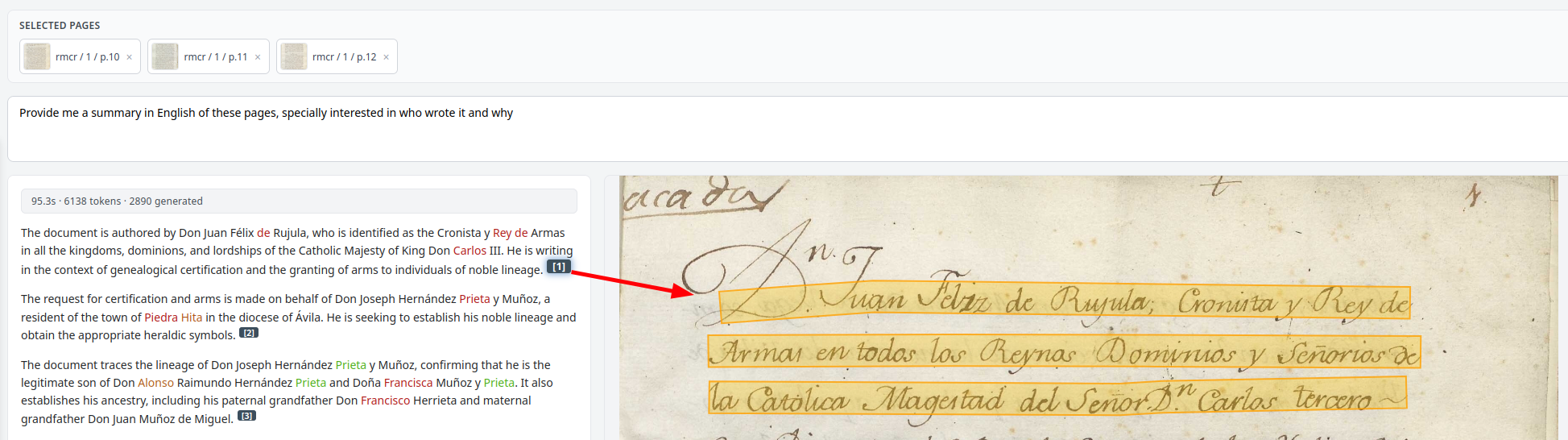 A plain-language answer with sources beside it. Every word in the summary is colour-coded by how confident the underlying transcription is.
It’s the most natural way to ask an archive a question, and the safest. The model doesn’t invent. It can’t — there is nothing to invent from.
The same engine, four faces — pick the one that fits the question. Most users settle into one or two and stay there. Power users move between them within a single session, narrowing with the tree, expanding with the flat list, sanity-checking with the statistics, exploring with meaning.
← How archAIc reads · Next: working with the rest of the archival world →